EDB - Installing EDB Postgres Advanced Server 16
1. Setup repository
[root@edb-saigon ~]# curl -1sLf 'https://downloads.enterprisedb.com/XYZ/enterprise/setup.rpm.sh' | sudo -E bash
... ... ...
... ... ...
OK: Updating the dnf cache to fetch the new repository metadata ...
OK: The repository has been installed successfully - You're ready to rock!
[root@edb-saigon ~]# curl -1sLf 'https://downloads.enterprisedb.com/XYZ/enterprise/setup.rpm.sh' | sudo -E bash
... ... ...
... ... ...
OK: Updating the dnf cache to fetch the new repository metadata ...
OK: The repository has been installed successfully - You're ready to rock!
Note:
Install EPAS v16, we need lz4 package. So we must to configure Oracle Linux Yum Repo.
Install EPAS v16, we need lz4 package. So we must to configure Oracle Linux Yum Repo.
[root@edb-nhatrang ~]# vi
/etc/yum.repos.d/oracle-linux-9u4.repo
[ol9_baseos_latest]name=Oracle Linux 9 BaseOS Latest ($basearch)
baseurl=https://yum.oracle.com/repo/OracleLinux/OL9/baseos/latest/$basearch/
gpgkey=file:///etc/pki/rpm-gpg/RPM-GPG-KEY-oracle
gpgcheck=1
enabled=1
[ol9_appstream_latest]
name=Oracle Linux 9 AppStream ($basearch)
baseurl=https://yum.oracle.com/repo/OracleLinux/OL9/appstream/$basearch/
gpgkey=file:///etc/pki/rpm-gpg/RPM-GPG-KEY-oracle
gpgcheck=1
enabled=1
name=Oracle Linux 9 AppStream ($basearch)
baseurl=https://yum.oracle.com/repo/OracleLinux/OL9/appstream/$basearch/
gpgkey=file:///etc/pki/rpm-gpg/RPM-GPG-KEY-oracle
gpgcheck=1
enabled=1
[ol9_developer_latest]
name=Oracle Linux 9 Developer ($basearch)
baseurl=https://yum.oracle.com/repo/OracleLinux/OL9/developer/EPEL/$basearch/
gpgkey=file:///etc/pki/rpm-gpg/RPM-GPG-KEY-oracle
gpgcheck=1
enabled=1
name=Oracle Linux 9 Developer ($basearch)
baseurl=https://yum.oracle.com/repo/OracleLinux/OL9/developer/EPEL/$basearch/
gpgkey=file:///etc/pki/rpm-gpg/RPM-GPG-KEY-oracle
gpgcheck=1
enabled=1
[root@edb-nhatrang ~]# wget
https://yum.oracle.com/RPM-GPG-KEY-oracle-ol9 -O
/etc/pki/rpm-gpg/RPM-GPG-KEY-oracle
[root@edb-nhatrang ~]# dnf clean all
[root@edb-nhatrang ~]# dnf repolist
[root@edb-nhatrang ~]# dnf repolist
2. Install the software packages
[root@edb-saigon ~]# dnf -y install
edb-as16-server
[root@edb-saigon ~]# id enterprisedb
uid=986(enterprisedb) gid=983(enterprisedb) groups=983(enterprisedb)
uid=986(enterprisedb) gid=983(enterprisedb) groups=983(enterprisedb)
[root@edb-saigon ~]# passwd
enterprisedb
[root@edb-saigon ~]# mkdir -p
/u01/edb/as16/data
[root@edb-saigon ~]# chown enterprisedb:enterprisedb -R /u01
[root@edb-saigon ~]# chown enterprisedb:enterprisedb -R /u01
[root@edb-saigon ~]# vi
/lib/systemd/system/edb-as-16.service
# Location of database directory
Environment=PGDATA=/u01/edb/as16/data
# Location of database directory
Environment=PGDATA=/u01/edb/as16/data
[root@edb-saigon ~]# sudo PGSETUP_INITDB_OPTIONS="-E
UTF-8" /usr/edb/as16/bin/edb-as-16-setup initdb
Initializing database ... OK
Initializing database ... OK
[root@edb-saigon ~]# systemctl start
edb-as-16.service
[root@edb-saigon ~]# systemctl enable
edb-as-16.service
Created symlink /etc/systemd/system/multi-user.target.wants/edb-as-16.service → /usr/lib/systemd/system/edb-as-16.service.
Created symlink /etc/systemd/system/multi-user.target.wants/edb-as-16.service → /usr/lib/systemd/system/edb-as-16.service.
[root@edb-saigon ~]# systemctl status
edb-as-16.service
Configuring env for this database
[enterprisedb@edb-saigon ~]$ vi .bash_profile
PGDATA=/u01/edb/as16/data
export PGDATA
export PGHOME=/usr/edb/as16
export PATH=$PATH:$HOME/bin:$PGHOME/bin
# If you want to customize your settings,
# Use the file below. This is not overridden
# by the RPMS.
[ -f /var/lib/edb/.enterprisedb_profile ] && source /var/lib/edb/.enterprisedb_profile
[enterprisedb@edb-saigon ~]$ vi .bash_profile
PGDATA=/u01/edb/as16/data
export PGDATA
export PGHOME=/usr/edb/as16
export PATH=$PATH:$HOME/bin:$PGHOME/bin
# If you want to customize your settings,
# Use the file below. This is not overridden
# by the RPMS.
[ -f /var/lib/edb/.enterprisedb_profile ] && source /var/lib/edb/.enterprisedb_profile
[enterprisedb@edb-saigon ~]$ psql edb
4. Import sample database "employees"
[enterprisedb@edb-saigon data]$
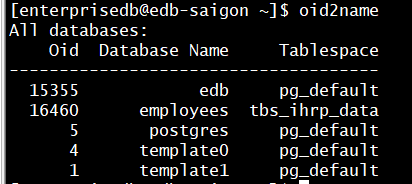
oid2name
All databases:
Oid Database Name Tablespace
----------------------------------
15355 edb pg_default
5 postgres pg_default
4 template0 pg_default
1 template1 pg_default
[enterprisedb@edb-saigon ~]$ psql edb
edb=# \l+
edb=# \du+
Create owner user for "employees" database
edb=# create user cherry with login password 'password';
Create default tablespace for "employees" database
edb=# create tablespace tbs_ihrp_data owner cherry location '/u01/ihrp/data';
edb=# create tablespace tbs_ihrp_index owner cherry location '/u01/ihrp/index';

Create "employees" database and grant privileges to cherry user
edb=# create database employees tablespace tbs_ihrp_data ;
edb=# grant connect on database employees to cherry ;
edb=# grant all privileges on database employees to cherry ;
Create "employees" schema into "employees" database
edb=# \c employees cherry
edb=# create schema employees;
employees=> \dn+;
Restore "employees" database
[enterprisedb@edb-saigon data]$ vi pg_hba.conf
#
"local" is for Unix domain socket connections only
local all all trust
local all all trust
[enterprisedb@edb-saigon ~]$ systemctl restart edb-as-16.service
[enterprisedb@edb-saigon ~]$ pg_restore -U cherry -d employees -Fc
/source/employees.sql.gz -c -v --no-owner --no-privileges
Verify information
employees=> set search_path = employees ;
employees=> \dt+

Ref:

Comments
Post a Comment